|
|

|
|
|
|
|
1 of 10 |
|



|
|
|
|
|
|
|
|
|
|
|||
|
|
|
|
|
|
|
|
|
||||
|
|
|
|
|
|
|
||||||
|
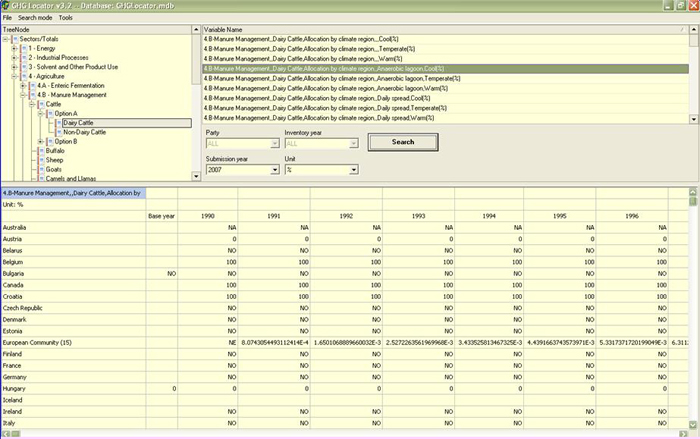
The Locator tool is a user
friendly search engine that provides access to the Secretariat’s CRF
database and therefore all the data submitted by Parties over the last
several years in their CRF tables. As shown in the figure, you can sort or
search data according to Parties, submission year, category, greenhouse gas,
CRF table, and specific data type (e.g., emissions, activity data, emission
factors, etc.). The Locator gives you
quick access to data with maximum flexibility. It is often the most efficient
way to find the data you are searching for while performing a review. The
Locator allows you to search for data for a particular Party or, for all
Parties. The searches in the
Locator are based on the category tree, which can be found in the upper left.
This category tree corresponds to the sectors and levels in the CRF tables
(e.g., sector, sub-sectors, categories ). To search for data for a specific
sector, select that sector in the category tree. If the category has
sub-sectors, this will be indicated by a "+ " sign in front of the
sector name. Similarly, if a sector contains information for specific
categories, this will also be indicated by a "+". Once you have selected the
appropriate categories, you need to specify the type of information to be
searched. The information options are given under the "Variables"
box. The general options are emissions, activity data, and IEFs. The remainder of this
section will give you further guidance on how to use Locator to further
specify your search.
|
|||||||||||
|
|
|||||||||||
|
|
|||||||||||